Spot AI
Cases
I designed a feature called Cases that helps teams organize video clips into structured incident investigations and collaborate in one place. The system combined video evidence, tags, external links, collaborator management, annotations, and comments so teams could document what happened and work together without relying on scattered tools. It is now one of the most used features in the product, and users consistently report that it makes incident review more organized, collaborative, and actionable.
Context
I worked on the design of a feature called Cases, which allowed users to organize video clips related to incidents and collaborate with others during investigations. Our customers were using video to review safety, security, and operational events, but they lacked a structured way to document what happened, share context, and work together on resolving incidents. My role was to design a system that turned raw video footage into something teams could investigate and act on collectively.
Problem
Users needed more than just access to video clips. They needed a way to document incidents, organize related evidence, and collaborate with others. Without a central structure, information lived in scattered clips, emails, and external documents. Teams struggled to keep track of what had been reviewed, who was involved, and what the current status of an incident was. They also needed to tag incidents for organization, attach external links and forms, manage collaborators, and communicate directly on the video itself. The challenge was to create a workflow that supported investigation and collaboration without making the experience feel heavy or administrative.
Approach
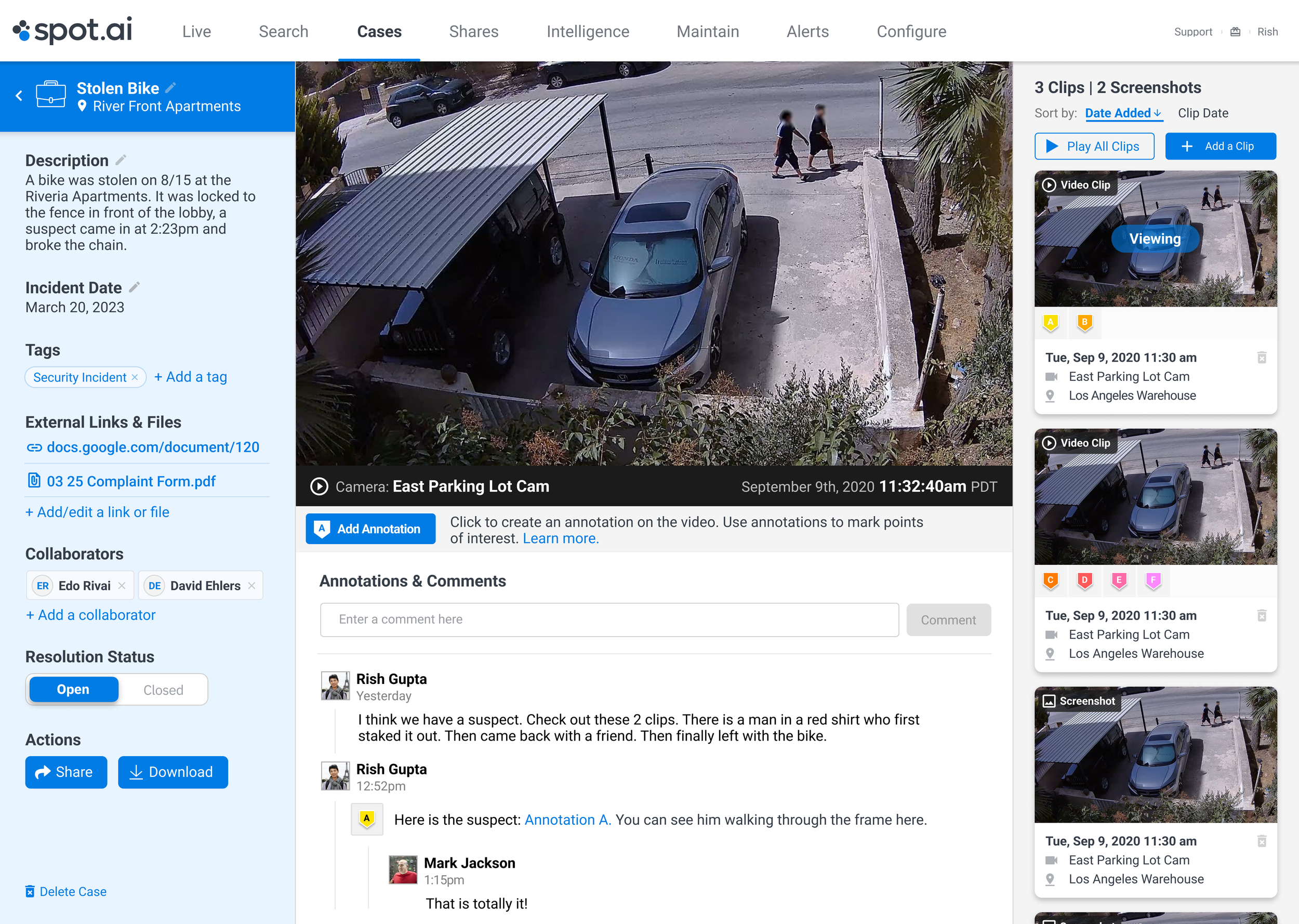
I designed Cases as a flexible container for investigation work rather than a rigid ticketing system. A key decision was to keep the experience centered around video while layering in documentation and collaboration tools. Users could compile multiple clips into a single case, then add tags, descriptions, external links, and files to provide context. I introduced role-based collaboration so users could easily invite others and manage access without overcomplicating permissions.
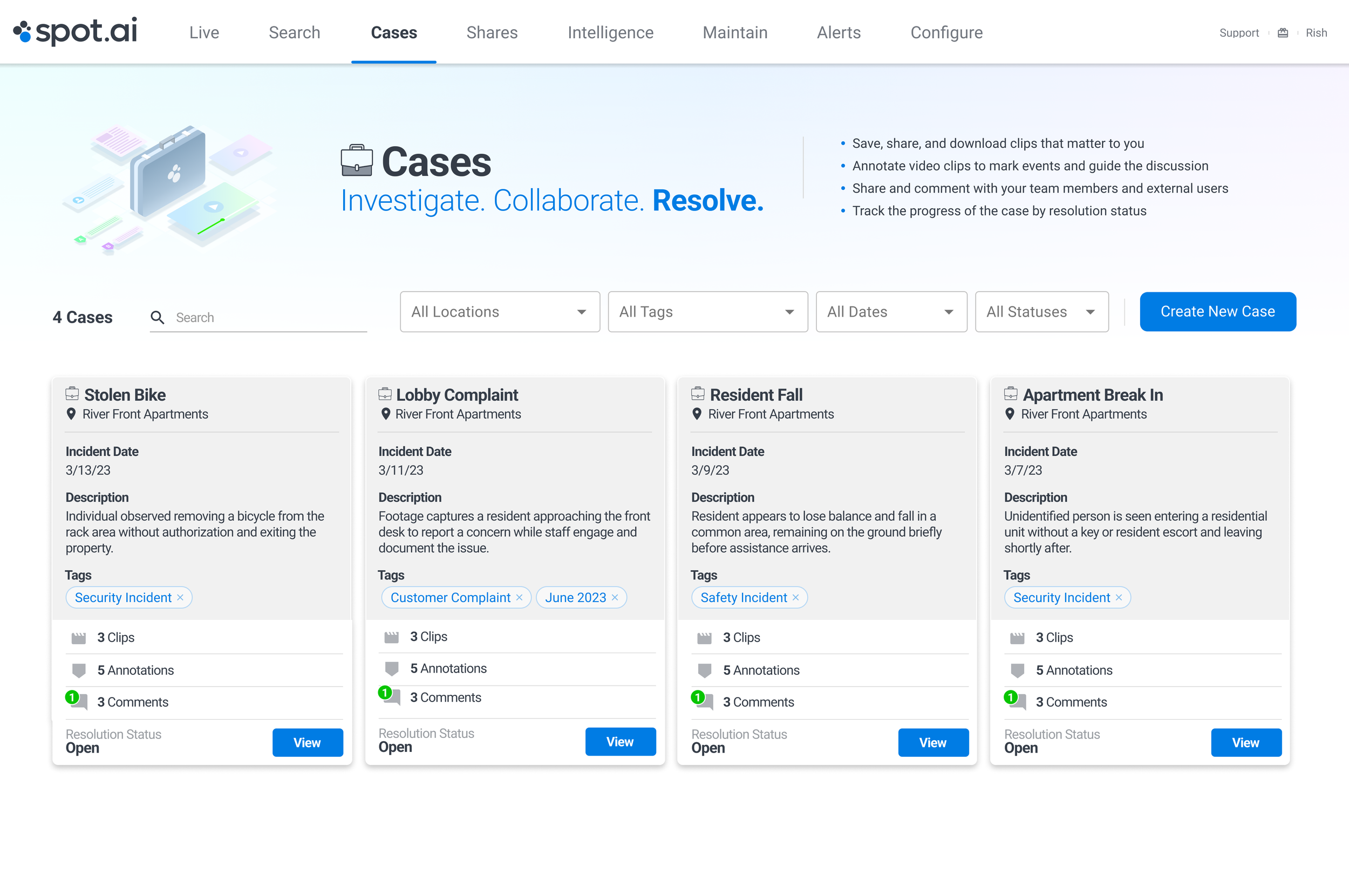
For video review, I designed in-video annotations and threaded comments so discussion stayed tied to visual evidence rather than separate tools. This helped reduce context switching and made it easier to align on what happened. One tradeoff was balancing structure with speed. Adding too many required fields would slow users down during time-sensitive investigations, so the system emphasized optional organization tools that teams could adopt as needed. Another tradeoff involved visibility versus simplicity. While advanced filtering and metadata were important, I prioritized a clean case overview that made it easy to scan status, activity, and key information at a glance.
Output
The feature included a Cases home where users could browse and filter incidents, a case detail view for documenting incident information and managing collaborators, and tools for adding clips, tags, external links, and files. Inside the video experience, users could create annotations and leave comments tied directly to specific moments. The system supported resolution tracking so teams could move cases from open to closed and maintain a record of investigation activity.
Outcome
Cases became the central place where teams documented and collaborated on incidents. By bringing video, context, and communication into one workflow, the feature reduced reliance on scattered tools and made investigations more coordinated. It is now one of the most used features in the product, and user feedback consistently reflects that it makes incident review more organized, collaborative, and actionable.